Tutorial Registrasi Atlet di Basketyuk (IBIS)
Daftar Isi
Panduan Lengkap untuk Mendaftarkan Atlet ke Indonesian Basketball Integrated System (IBIS)
Berdasarkan panduan resmi Athlete Registration Guide Basketyuk.
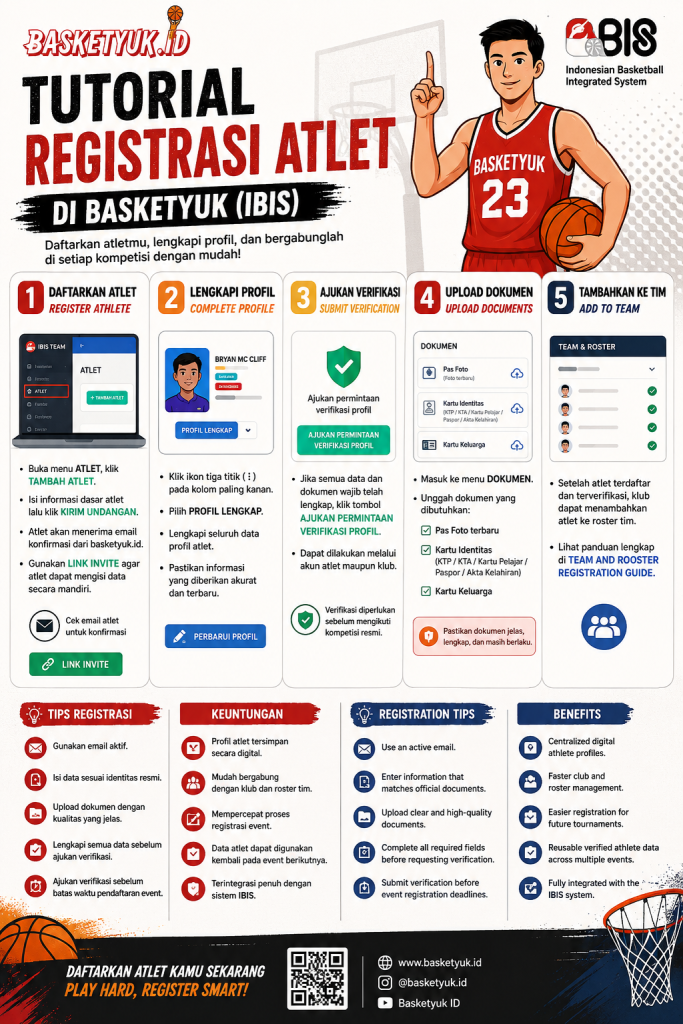
Bahasa Indonesia
Cara Registrasi Atlet di Basketyuk (IBIS)
Registrasi atlet merupakan langkah awal agar pemain dapat bergabung dengan klub, mengikuti kompetisi, dan memperoleh status terverifikasi di Indonesian Basketball Integrated System (IBIS) melalui Basketyuk.
Melalui sistem ini, klub dapat mengelola data atlet secara digital, sementara atlet juga dapat melengkapi informasi profilnya secara mandiri.
Langkah 1 — Masuk ke Menu Atlet
Setelah login ke akun klub:
Buka menu Atlet (Athlete) pada dashboard.
Klik tombol Tambah Atlet.
Isi informasi dasar atlet seperti:
Nama Lengkap
Jenis Kelamin
Tanggal Lahir
Tempat Lahir
Email
Password
Klik Kirim Undangan atau Simpan setelah data selesai diisi.
Setelah proses berhasil, atlet akan menerima email konfirmasi dari Basketyuk untuk melanjutkan proses registrasi. Klub juga dapat menggunakan fitur Link Invite agar atlet dapat mengisi data pribadi secara mandiri.
Langkah 2 — Lengkapi Profil Atlet
Setelah atlet berhasil dibuat:
Klik ikon tiga titik (⋮) pada daftar atlet.
Pilih Profil Lengkap.
Lengkapi seluruh informasi profil atlet.
Simpan perubahan dengan memilih Perbarui Profil.
Pastikan seluruh informasi yang dimasukkan merupakan data terbaru dan sesuai dengan identitas atlet agar dapat digunakan pada setiap penyelenggaraan event.
Langkah 3 — Ajukan Verifikasi Profil
Jika seluruh informasi telah lengkap:
Klik tombol Ajukan Permintaan Verifikasi Profil.
Pengajuan dapat dilakukan melalui:
akun atlet, atau
akun klub.
Verifikasi diperlukan agar status atlet menjadi valid dan dapat digunakan dalam kompetisi resmi.
Langkah 4 — Upload Dokumen Verifikasi
Masuk ke menu Dokumen, kemudian unggah seluruh dokumen yang dipersyaratkan.
Dokumen yang wajib disiapkan meliputi:
Pas Foto terbaru
Kartu Identitas:
KTP
KTA
Kartu Pelajar
Paspor
Akta Kelahiran
Kartu Keluarga (KK)
Pastikan dokumen yang diunggah jelas dan masih berlaku untuk mempercepat proses verifikasi.
Langkah 5 — Tambahkan Atlet ke Tim
Setelah atlet berhasil terdaftar dan proses verifikasi selesai, klub dapat menambahkan atlet ke dalam roster tim melalui menu Team & Roster sesuai panduan registrasi tim.
Tips Registrasi
Agar proses verifikasi berjalan lebih cepat:
Gunakan alamat email aktif.
Isi seluruh data sesuai identitas resmi.
Upload dokumen dengan kualitas yang jelas.
Pastikan seluruh data telah diperbarui sebelum mengajukan verifikasi.
Lakukan verifikasi sesegera mungkin sebelum pendaftaran event ditutup.
Keuntungan Registrasi Atlet di Basketyuk
Profil atlet tersimpan secara digital.
Mudah bergabung dengan klub dan roster tim.
Mempercepat proses registrasi event.
Data atlet dapat digunakan kembali pada event berikutnya.
Mendukung sistem IBIS (Indonesian Basketball Integrated System) secara terintegrasi.
English
How to Register an Athlete on Basketyuk (IBIS)
Athlete registration is the first step for players who wish to join a club, participate in basketball competitions, and obtain a verified athlete profile within the Indonesian Basketball Integrated System (IBIS).
The platform allows clubs to manage athlete data digitally while enabling athletes to complete their own personal profiles.
Step 1 — Register a New Athlete
After logging into your club account:
Open the Athlete menu from the dashboard.
Click Add Athlete.
Complete the athlete's basic information:
Full Name
Gender
Date of Birth
Place of Birth
Email Address
Password
Click Send Invitation or Save.
The athlete will receive a confirmation email from Basketyuk to continue the registration process. Clubs may also share the Invite Link, allowing athletes to complete their own profiles independently.
Step 2 — Complete the Athlete Profile
After the athlete has been created:
Click the three-dot menu (⋮) beside the athlete's name.
Select Complete Profile.
Fill in all required personal information.
Click Update Profile.
Always provide accurate and up-to-date information to ensure eligibility for future tournaments and events.
Step 3 — Submit Profile Verification
Once the athlete's profile is complete:
Click Submit Profile Verification Request.
The request may be submitted either by:
the athlete, or
the club administrator.
Profile verification is required before participating in official competitions.
Step 4 — Upload Verification Documents
Open the Documents menu and upload all required verification files.
Required documents include:
Recent passport-size photo
Valid identification document:
National ID Card
Athlete Card
Student Card
Passport
Birth Certificate
Family Card
Make sure all uploaded documents are clear, complete, and valid to avoid delays during verification.
Step 5 — Add the Athlete to a Team
After successful registration and verification, the club can add the athlete to the team roster through the Team & Roster module following the official Team Registration Guide.
Registration Tips
To ensure a smooth verification process:
Use an active email address.
Enter accurate information that matches official documents.
Upload high-quality document scans.
Complete all required profile fields before requesting verification.
Submit your verification before event registration deadlines.
Benefits of Registering Athletes with Basketyuk
Centralized digital athlete profiles.
Faster club and roster management.
Easier registration for future tournaments.
Reusable verified athlete data across multiple events.
Fully integrated with the Indonesian Basketball Integrated System (IBIS).