Tutorial Registrasi Official di Basketyuk (IBIS)
Daftar Isi
Panduan Lengkap untuk Mendaftarkan Official Klub
Artikel ini disusun berdasarkan Official Registration Guide Rev.2 (26.01.2026) dari Basketyuk IBIS.
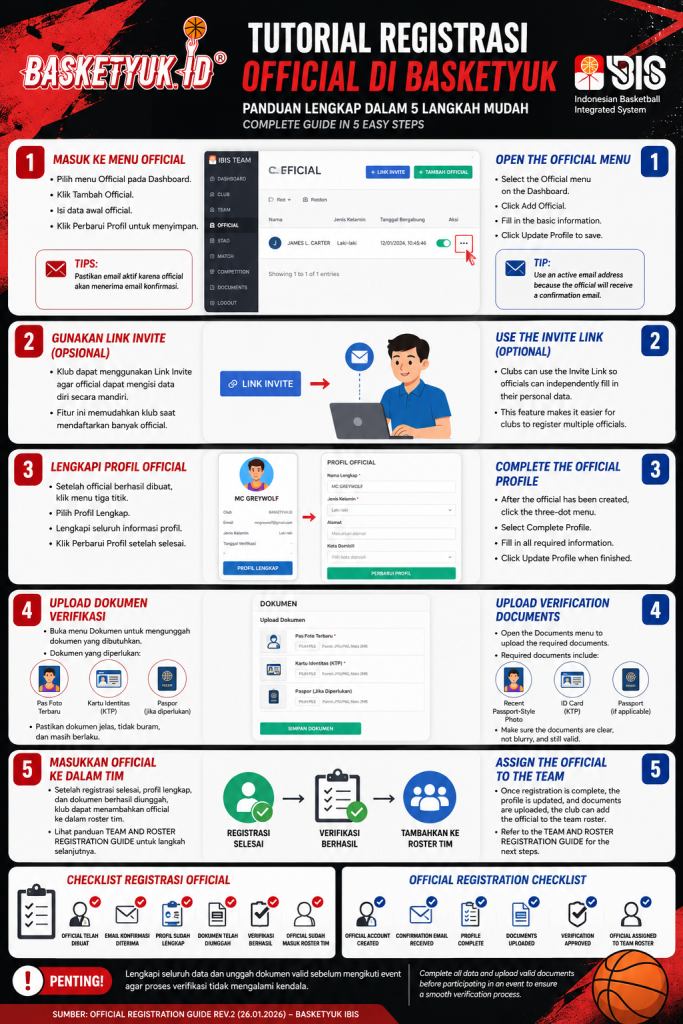
Tutorial Registrasi Official di Basketyuk (IBIS)
Official merupakan bagian penting dalam setiap klub bola basket. Melalui Indonesian Basketball Integrated System (IBIS) di Basketyuk.id, klub dapat mendaftarkan official secara digital, melengkapi profil, mengunggah dokumen verifikasi, hingga menempatkan official ke dalam roster tim.
Ikuti panduan berikut agar proses registrasi berjalan dengan cepat dan tanpa kendala.
Langkah 1 — Masuk ke Menu Official
Setelah login sebagai akun klub:
Buka Dashboard IBIS.
Pilih menu Official.
Klik tombol Tambah Official.
Isi data awal official, seperti:
Nama Lengkap
Jenis Kelamin
Nomor Identitas
Email
Tanggal Bergabung dengan Klub
Setelah seluruh data terisi, klik Perbarui Profil untuk menyimpan data.
Tips
Pastikan alamat email yang digunakan aktif karena sistem akan mengirimkan email konfirmasi kepada official yang didaftarkan.
Langkah 2 — Gunakan Link Invite (Opsional)
Selain didaftarkan langsung oleh klub, Basketyuk juga menyediakan fitur Link Invite.
Melalui fitur ini, official dapat:
menerima tautan undangan,
mengisi data pribadi secara mandiri,
mempercepat proses administrasi klub.
Fitur ini sangat membantu apabila klub memiliki banyak official yang harus didaftarkan.
Langkah 3 — Lengkapi Profil Official
Setelah official berhasil dibuat:
Klik menu tiga titik pada daftar official.
Pilih Profil Lengkap.
Lengkapi seluruh informasi profil official.
Klik Perbarui Profil setelah semua data selesai diisi.
Semakin lengkap informasi yang diisi, semakin cepat proses verifikasi dilakukan.
Langkah 4 — Upload Dokumen Verifikasi
Untuk melakukan proses verifikasi akun official:
Buka menu Dokumen.
Unggah seluruh dokumen yang diperlukan.
Dokumen yang wajib disiapkan meliputi:
Pas Foto terbaru
Kartu Tanda Penduduk (KTP)
Paspor (jika diperlukan)
Pastikan dokumen terlihat jelas, tidak buram, dan masih berlaku agar proses verifikasi berjalan lancar.
Langkah 5 — Masukkan Official ke Dalam Tim
Setelah:
registrasi selesai,
profil lengkap,
dokumen berhasil diunggah,
klub dapat menambahkan official ke dalam roster tim melalui menu Team & Roster sesuai panduan Team and Roster Registration Guide.
Checklist Registrasi Official
Sebelum proses dianggap selesai, pastikan:
✅ Official telah dibuat
✅ Email konfirmasi telah diterima
✅ Profil sudah lengkap
✅ Dokumen telah diunggah
✅ Verifikasi berhasil
✅ Official sudah dimasukkan ke roster tim
Penutup
Dengan sistem IBIS di Basketyuk.id, proses registrasi official menjadi lebih cepat, terdokumentasi dengan baik, dan terintegrasi langsung dengan data klub serta kompetisi. Pastikan seluruh data dan dokumen telah lengkap sebelum mengikuti event agar proses verifikasi tidak mengalami kendala.
Official Registration Tutorial on Basketyuk (IBIS)
Officials play an essential role in every basketball club. Through the Indonesian Basketball Integrated System (IBIS) on Basketyuk.id, clubs can digitally register officials, complete their profiles, upload verification documents, and assign them to team rosters.
Follow the steps below to complete the registration process successfully.
Step 1 — Open the Official Menu
After logging in as a club:
Open the IBIS Dashboard.
Select the Official menu.
Click Add Official.
Enter the official's basic information:
Full Name
Gender
Identification Number
Email Address
Club Joining Date
Click Update Profile to save the information.
Tip
Use an active email address because Basketyuk will send a confirmation email to the registered official.
Step 2 — Use the Invite Link (Optional)
Clubs may also use the Invite Link feature.
With this feature, officials can:
receive an invitation link,
complete their own personal information,
simplify the registration process.
This is especially useful when registering multiple officials at once.
Step 3 — Complete the Official Profile
After the official has been created:
Click the three-dot menu beside the official's name.
Select Complete Profile.
Fill in all required profile information.
Click Update Profile when finished.
Providing complete information helps speed up the verification process.
Step 4 — Upload Verification Documents
To complete verification:
Open the Documents menu.
Upload all required documents.
Required documents include:
Recent passport-style photo
National ID Card
Passport (if applicable)
Ensure all uploaded documents are clear, readable, and valid to avoid delays during verification.
Step 5 — Assign the Official to the Team
Once the registration is complete, the profile has been updated, and verification documents have been uploaded, the club can assign the official to a team roster through the Team & Roster module, following the Team and Roster Registration Guide.
Official Registration Checklist
Before participating in an event, make sure:
✅ Official account has been created
✅ Confirmation email has been received
✅ Profile is complete
✅ Verification documents are uploaded
✅ Verification has been approved
✅ Official has been assigned to the team roster
Conclusion
IBIS on Basketyuk.id provides a centralized and efficient registration system for basketball clubs across Indonesia. By completing every registration step and uploading valid documents, clubs can ensure a smooth verification process and be fully prepared for upcoming competitions.