Cara Mutasi Pemain di Basketyuk (Pinjam atau Pindah ke Klub Lain)
Daftar Isi
Panduan Lengkap untuk Atlet dan Admin Klub
Berdasarkan Panduan Mutasi Atlet IBIS (Indonesian Basketball Integrated System)
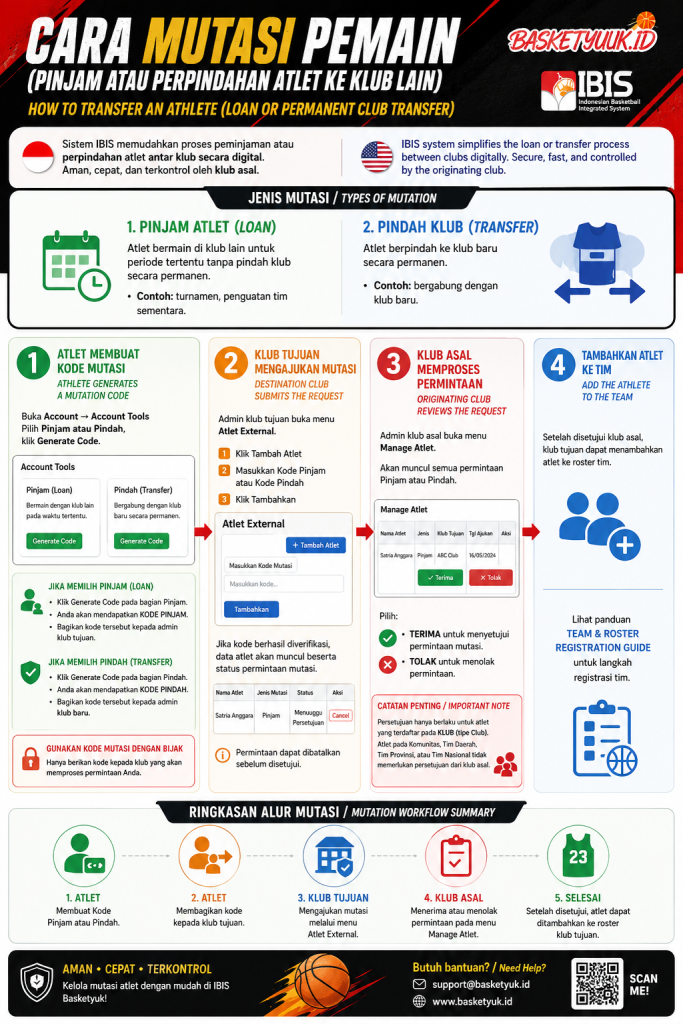
Cara Mutasi Pemain (Pinjam atau Perpindahan Atlet ke Klub Lain)
Sistem IBIS (Indonesian Basketball Integrated System) di Basketyuk menyediakan fitur mutasi atlet yang memudahkan proses peminjaman maupun perpindahan permanen antar klub secara digital.
Melalui sistem ini, atlet dapat membuat Kode Mutasi, kemudian klub tujuan dapat mengajukan permintaan secara online tanpa proses administrasi yang rumit. Seluruh proses tetap berada dalam kontrol klub asal sehingga keamanan data atlet tetap terjaga.
Jenis Mutasi Atlet
Terdapat dua jenis mutasi yang tersedia:
1. Pinjam Atlet (Loan)
Digunakan apabila atlet hanya ingin bermain bersama klub lain dalam periode tertentu tanpa berpindah klub secara permanen.
Contoh penggunaan:
Mengikuti turnamen bersama klub lain.
Memperkuat tim pada kompetisi tertentu.
Status atlet tetap berada di klub asal.
2. Pindah Klub (Transfer)
Digunakan apabila atlet ingin berpindah ke klub baru secara permanen.
Contoh penggunaan:
Bergabung dengan klub baru.
Data atlet dipindahkan ke klub tujuan setelah proses disetujui.
Langkah 1 — Atlet Membuat Kode Mutasi
Masuk ke akun IBIS Atlet, kemudian buka:
Account → Account Tools
Di halaman ini tersedia dua pilihan:
Pinjam
Pindah
Pilih sesuai kebutuhan kemudian klik Generate Code untuk membuat kode mutasi.
Jika Memilih Pinjam
Klik tombol Generate Code pada bagian Pinjam.
Sistem akan menghasilkan Kode Pinjam.
Selanjutnya:
salin kode tersebut,
kirimkan kepada admin klub yang ingin meminjam Anda.
Kode tersebut digunakan oleh klub tujuan untuk mengajukan peminjaman atlet.
Jika Memilih Pindah
Klik Generate Code pada bagian Pindah.
Sistem akan menghasilkan Kode Pindah.
Bagikan kode tersebut kepada admin klub baru agar mereka dapat mengajukan perpindahan atlet secara permanen.
Gunakan Kode Mutasi dengan Bijak
Kode mutasi hanya diberikan kepada klub yang memang akan memproses peminjaman atau perpindahan Anda.
Jangan membagikan kode kepada pihak lain yang tidak berkepentingan.
Langkah 2 — Klub Tujuan Mengajukan Mutasi
Administrator klub tujuan login ke IBIS Team.
Kemudian buka menu:
Atlet External
Pada halaman tersebut:
Klik Tambah Atlet
Masukkan Kode Pinjam atau Kode Pindah
Klik Tambahkan
Apabila kode berhasil diverifikasi, data atlet akan muncul beserta status permintaan mutasi.
Selama proses berlangsung, permintaan masih dapat dibatalkan apabila diperlukan.
Langkah 3 — Klub Asal Memproses Permintaan
Administrator klub asal membuka menu:
Manage Atlet
Di halaman ini akan muncul seluruh permintaan:
Pinjam Atlet
Perpindahan Atlet
Admin klub asal dapat memilih:
✅ Terima
atau
❌ Tolak
Keputusan tersebut akan menentukan apakah mutasi dapat dilanjutkan atau tidak.
Catatan Penting
Persetujuan dari klub asal hanya berlaku bagi atlet yang terdaftar pada Klub.
Sedangkan atlet yang berasal dari:
Komunitas
Tim Daerah
Tim Provinsi
Tim Nasional
tidak memerlukan proses persetujuan dari klub asal.
Langkah 4 — Tambahkan Atlet ke Tim
Setelah permintaan mutasi disetujui oleh klub asal, klub tujuan dapat menambahkan atlet ke dalam roster tim melalui menu registrasi tim sesuai dengan Panduan Team & Roster Registration.
Ringkasan Alur Mutasi
Atlet membuat Kode Pinjam atau Kode Pindah.
Atlet membagikan kode kepada klub tujuan.
Klub tujuan mengajukan mutasi melalui menu Atlet External.
Klub asal menerima atau menolak permintaan pada menu Manage Atlet.
Setelah disetujui, atlet dapat ditambahkan ke roster klub tujuan.
How to Transfer an Athlete (Loan or Permanent Club Transfer)
The IBIS (Indonesian Basketball Integrated System) on Basketyuk provides a digital athlete transfer feature that allows clubs and athletes to process temporary loans or permanent club transfers efficiently.
Athletes generate a mutation code, the destination club submits the request, and the originating club approves or rejects it through the system, ensuring secure and transparent athlete management.
Types of Athlete Mutation
Athlete Loan
A temporary move that allows an athlete to compete for another club for a specific period while remaining registered with the original club.
Typical use cases:
Playing in a tournament with another club
Temporary reinforcement for a competition
Permanent Transfer
A permanent move to a new club.
Typical use cases:
Joining a new club permanently
Athlete registration is transferred after approval
Step 1 — Athlete Generates a Mutation Code
Log in to your IBIS Athlete Account.
Open:
Account → Account Tools
Choose one of the following:
Loan
Transfer
Click Generate Code to create your mutation code.
Loan Code
Select Loan and click Generate Code.
The system will generate a Loan Code.
Share this code with the destination club so they can submit a loan request.
Transfer Code
Select Transfer and click Generate Code.
The system will generate a Transfer Code.
Provide this code to the administrator of your new club so they can process your permanent transfer request.
Use Your Mutation Code Responsibly
Only share your mutation code with the club that will officially process your loan or transfer request.
Step 2 — Destination Club Submits the Request
The destination club administrator logs into IBIS Team and opens:
External Athletes
Then:
Click Add Athlete
Enter the Loan Code or Transfer Code
Click Add
After successful verification, the athlete will appear in the request list along with the current mutation status.
Requests can still be cancelled before approval if necessary.
Step 3 — Originating Club Reviews the Request
The originating club administrator opens:
Manage Athletes
All incoming loan and transfer requests will be displayed.
The administrator can choose:
Approve
Reject
This decision determines whether the athlete's mutation process continues.
Important Note
Approval is required only for athletes registered under Club-type organizations.
Athletes registered with:
Community Clubs
Regional Teams
Provincial Teams
National Teams
do not require approval from the originating club.
Step 4 — Add the Athlete to the Team
Once the originating club approves the request, the destination club can register the athlete into its roster by following the Team & Roster Registration Guide.
Mutation Workflow Summary
Athlete generates a Loan Code or Transfer Code.
Athlete shares the code with the destination club.
Destination club submits the request via External Athletes.
Originating club reviews the request in Manage Athletes.
Once approved, the athlete can be added to the destination club's team roster.